Instance settings
As an administrator, you have control over instance possible login methods and users. To access it, click "Users" icon on the dashboard, or click one of the relevant options from the settings sidebar.

Users
In the table you can see most important information about each user: name, username, e-mail and last login time. Here you can also grant users administrator rights by toggling the switch blue.
You can manually add new users with the "add user" button here. If you have disabled user registration, new users cannot log into the instance if you didn't add them. To add new user you have to provide an e-mail, password, name and (optional) username.
As an administrator, you have control over users information. When you click on the pencil icon, you can access the all of the personal settings of each individual user. You can change them all without knowing their current password. Pretty handy! You can also check account activity — including when the user account was created and when the user’s information was last updated (for example, after a password change). You can also view the user’s activity log, which lists all actions performed across projects and boards.

This is the default column selection. Similar to the list view, you can show or hide additional columns with extra information (see pictures below). You can also adjust the table to fit the content or screen, and change the width of columns using the | separator.
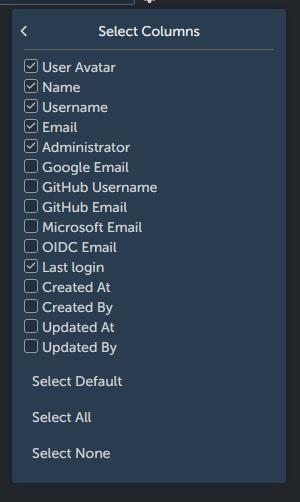
Here is the picture of all columns selected:

Instance options
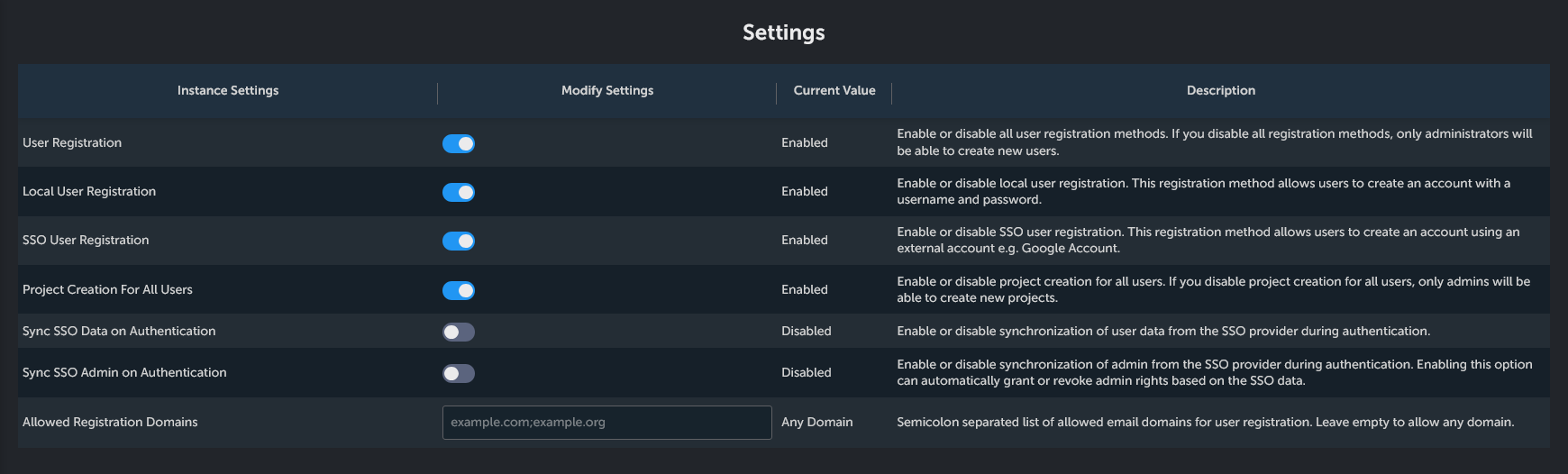
- Users registration: turn off if you want to retain full control over new users (they will have to be added manually).
- Local User registration: Turn on if you want new users to be able to register using e-mail and password.
- SSO User Registration: Turn on if you want to enable registration with SSO.
- Project Creation For All Users: Enable or disable project creation for all users. If you disable project creation for all users, only admins will be able to create new projects. Select this options if you want all your users to be able to create personal projects.
- Sync SSO Data on Authentication: Enable or disable synchronization of user data from the SSO provider during authentication.
- Sync SSO Admin on Authentication: Enable or disable synchronization of admin from the SSO provider during authentication. Enabling this option can automatically grant or revoke admin rights based on the SSO data.
- Allowed Registration Domains: Semicolon separated list of allowed email domains for user registration. Leave empty to allow any domain.